Introduction
Graphic design is one of the most exciting and in-demand creative fields in today’s digital world. From social media posts and logos to websites, packaging, and advertisements, graphic design shapes how brands communicate visually.
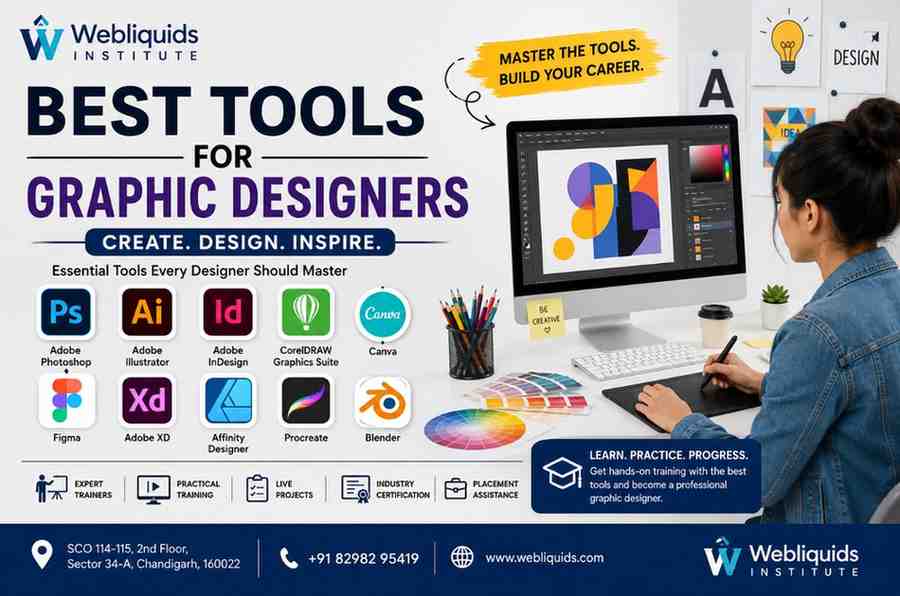
To create professional designs, every designer needs the right software and tools. If you are exploring the Best Tools for Graphic Designers, this comprehensive guide will help you understand which tools are most widely used, why they matter, and how learning them can boost your career.
Webliquids Institute offers practical graphic design training in Chandigarh, where students learn industry-standard tools through live projects and expert mentorship. Whether you are a student, freelancer, working professional, or entrepreneur, mastering the right tools can open doors to rewarding career opportunities.
What Are Graphic Design Tools?
Graphic design tools are software applications that help designers create visual content for digital and print media. These tools are used to design logos, posters, brochures, social media graphics, packaging, websites, and more.
Graphic design tools typically provide features for:
- Image editing
- Vector illustration
- Layout design
- Typography
- Color correction
- UI/UX design
- Animation and prototyping
Industry Relevance
Every creative agency, marketing company, e-commerce brand, and media organization relies on graphic design tools to produce professional visuals. This makes software proficiency a core requirement for modern designers.
Best Tools for Graphic Designers: Why They Matter
The Best Tools for Graphic Designers help professionals work efficiently, maintain quality, and meet client expectations.
Using the right tools allows designers to:
- Create high-quality visuals
- Save time with templates and automation
- Collaborate with clients and teams
- Export files for print and web
- Build consistent branding
Knowing multiple tools also makes designers more versatile and employable.
Why Learning Graphic Design Tools is Important
Essential for Career Growth
Most design jobs require proficiency in industry-standard software.
Improves Productivity
Advanced features and shortcuts speed up workflow.
Enhances Creativity
Professional tools allow greater design flexibility.
Supports Freelancing
Clients prefer designers familiar with trusted software.
Increases Job Opportunities
Software expertise is a key hiring criterion.
Top Graphic Design Tools Every Designer Should Know
Photoshop is the world’s leading image editing software.
Best For
- Photo editing
- Social media graphics
- Banner design
- Retouching
Key Features
- Layer-based editing
- Filters and effects
- Smart objects
- AI-powered tools
Illustrator is used for vector graphics and scalable designs.
Best For
- Logo design
- Icons
- Illustrations
- Branding
Key Features
- Pen tool
- Shape builder
- Artboards
Ideal for multi-page layouts and print design.
Best For
- Brochures
- Magazines
- Books
- Catalogs
A popular vector design tool widely used in print and signage.
Best For
- Print media
- Flex banners
- Packaging
Canva offers a beginner-friendly interface with ready-made templates.
Best For
- Social media posts
- Presentations
- Marketing materials
A collaborative design platform for UI/UX and prototyping.
Best For
- Website layouts
- App design
- Wireframes
Used for UI/UX design and interactive prototypes.
A cost-effective alternative to Illustrator.
A powerful digital illustration app for iPad users.
Open-source software for 3D design and animation.
How to Choose the Right Graphic Design Tool
The best tool depends on your goals.
For Beginners
For Branding and Logos
For Print Design
For UI/UX
For Illustration
Best Tools for Graphic Designers in Different Industries
Digital Marketing Agencies
Photoshop, Canva, Illustrator
Publishing
InDesign, Photoshop
Web Design
Figma, XD
Branding Agencies
Illustrator, Photoshop
Product Design
Figma, Blender
Future Scope of Graphic Design Tools
Design software continues to evolve rapidly.
Emerging Trends
- AI-powered design features
- Real-time collaboration
- 3D graphics
- Motion design
- Automation tools
Designers who stay updated with the Best Tools for Graphic Designers will remain highly competitive.
How Webliquids Institute Helps You Master Graphic Design Tools
Webliquids Institute offers hands-on training in leading design software.
Industry-Oriented Curriculum
Students learn:
- Photoshop
- Illustrator
- CorelDRAW
- Canva
- Figma
Practical Projects
Create logos, posters, brochures, and social media creatives.
Expert Trainers
Learn from experienced designers.
Portfolio Development
Build professional work samples.
Placement Assistance
Get support for resumes and interviews.
Teaching Approach at Webliquids Institute
Step-by-Step Instruction
Learn from basics to advanced concepts.
Live Assignments
Work on real-world design tasks.
Personalized Mentorship
Receive detailed feedback.
Career Preparation
Build a portfolio and job-ready skills.
Who Should Enroll?
Students
Start a creative career.
Working Professionals
Upgrade design skills.
Freelancers
Offer design services to clients.
Entrepreneurs
Create branding materials independently.
Content Creators
Design eye-catching visuals.
Benefits of Learning at Webliquids Institute
Technical Expertise
Master industry-standard tools.
Creative Development
Improve design thinking and aesthetics.
Career Growth
Access high-demand roles.
Job Readiness
Build a strong portfolio.
Freelancing Potential
Work with local and global clients.
Career Opportunities After Completing the Course
Job Roles
- Graphic Designer
- Visual Designer
- Brand Designer
- UI Designer
- Social Media Designer
- Packaging Designer
Freelancing Opportunities
Offer services such as:
- Logo design
- Social media creatives
- Brochure design
- Website graphics
Industry Sectors
- Advertising
- Digital marketing
- Publishing
- E-commerce
- Education
- Media
Salary Expectations in Graphic Design
Freshers
₹2.5 LPA to ₹5 LPA
Mid-Level Designers
₹5 LPA to ₹10 LPA
Senior Designers
₹10 LPA and above
Freelancers can earn based on project scope and client base.
Why Chandigarh is a Great Place to Learn Graphic Design
Chandigarh offers a strong ecosystem of creative agencies, startups, and training institutes, making it an excellent place to start a design career.
Institute Details
Ready to master professional design tools?
Address: SCO 114-115, 2nd Floor, Sector 34-A, Chandigarh, 160022
Phone: +91 82982 95419
Website: www.webliquids.com
Frequently Asked Questions (FAQs)
1. Which software is best for beginner graphic designers?
Canva and Adobe Photoshop are excellent starting points.
2. Is Adobe Illustrator used for logo design?
Yes, Illustrator is one of the best tools for creating scalable logos.
3. How long does it take to learn graphic design tools?
Most learners can gain practical skills in 3 to 6 months.
4. Can I freelance after learning these tools?
Yes, graphic design offers strong freelancing opportunities.
5. Do I need a powerful computer?
A modern computer with sufficient RAM is recommended for smooth performance.
6. Does Webliquids Institute provide practical training?
Yes, students work on live projects and build professional portfolios.
Conclusion
Mastering the Best Tools for Graphic Designers is essential for anyone who wants to build a successful career in visual communication. From Photoshop and Illustrator to Canva and Figma, each tool serves a specific purpose and expands your creative possibilities.
With expert guidance, practical projects, and industry-oriented training, Webliquids Institute helps students and professionals develop the technical and creative skills needed to thrive in graphic design.
Whether you want to work in an agency, freelance, or build your own brand, learning these tools is the first step toward a rewarding and future-ready career.