How to Compress Images Without Losing Quality: Complete Beginner's Guide
Introduction
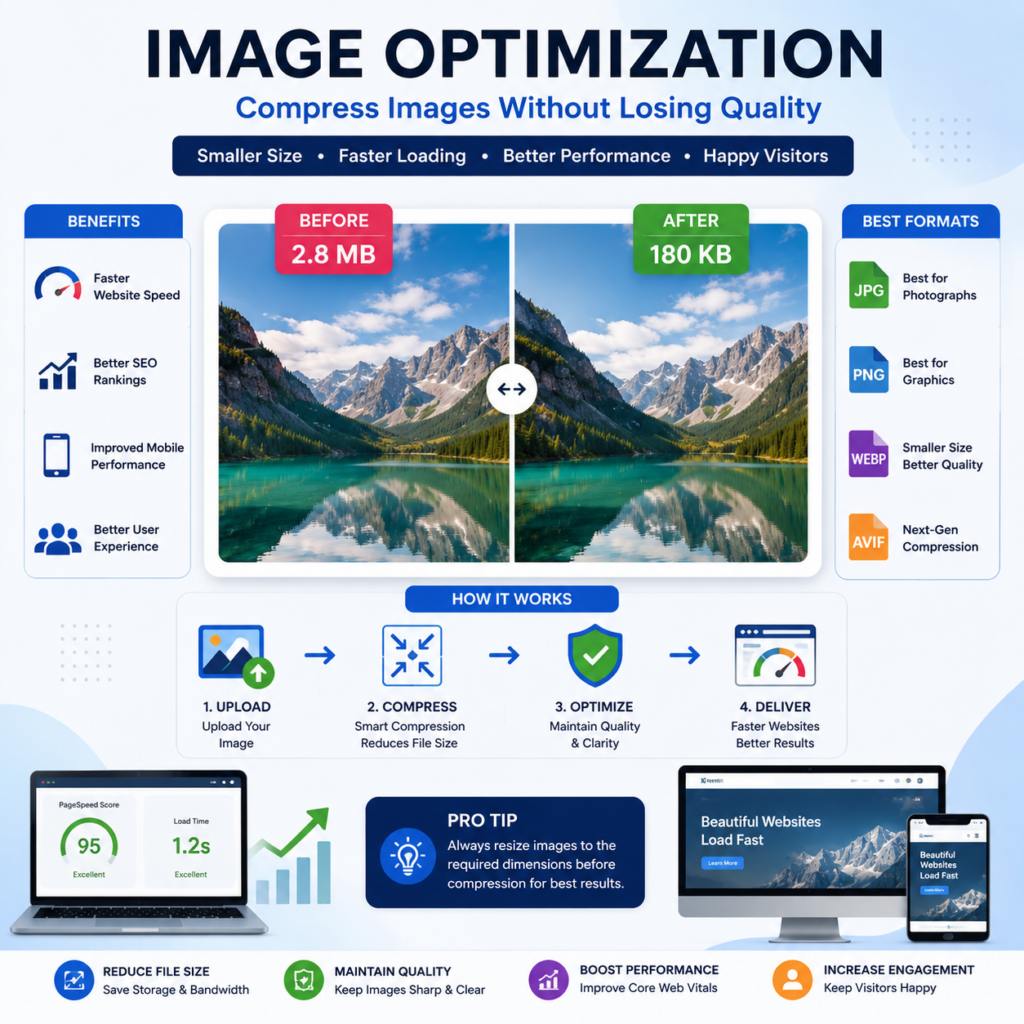
If you own a website, run an online store, manage a blog, or work in digital marketing, image optimization is something you cannot ignore. Large image files can slow down your website, affect user experience, and even impact search engine rankings. This is why understanding how to compress images without losing quality is an essential skill for website owners, content creators, designers, and marketers.
Many beginners assume that compressing images automatically makes them look blurry or pixelated. Fortunately, modern image optimization techniques allow you to significantly reduce file size while maintaining excellent visual quality. When done correctly, image compression improves website speed, enhances user experience, reduces storage requirements, and supports better SEO performance.
In this comprehensive guide, you will learn everything about how to compress images without losing quality, including compression methods, best image formats, recommended tools, common mistakes, and professional best practices.
Why Image Compression Matters for Websites
Images often account for the largest portion of a webpage’s total size. High-resolution photos can easily reach several megabytes, causing websites to load slowly.
Benefits of Image Compression
- Faster website loading speed
- Improved user experience
- Better mobile performance
- Reduced bandwidth usage
- Higher search engine rankings
- Improved Core Web Vitals
- Lower hosting costs
- Better conversion rates
Impact on SEO
Google considers page speed an important ranking factor. When images are not optimized, websites become slower and visitors are more likely to leave before the page loads completely.
Studies consistently show that users expect websites to load quickly. A delay of even a few seconds can increase bounce rates and reduce engagement.
Therefore, learning how to compress images without losing quality can directly contribute to better SEO performance and improved website results.
Understanding Image Compression Basics
Before compressing images, it is important to understand how image compression works.
What Is Image Compression?
Image compression is the process of reducing the file size of an image while preserving its visual appearance as much as possible.
The main goal is to remove unnecessary data so that the image occupies less storage space and loads faster online.
Two Main Types of Compression
1. Lossless Compression
Lossless compression reduces file size without removing important image information.
Benefits include:
- No visible quality loss
- Perfect image reproduction
- Suitable for logos and graphics
- Ideal for professional projects
Examples:
- PNG compression
- Certain WebP compression methods
- TIFF optimization
2. Lossy Compression
Lossy compression removes some image data to achieve a smaller file size.
Benefits include:
- Much smaller file sizes
- Faster loading times
- Excellent for website images
Examples:
- JPEG compression
- WebP compression
- AVIF compression
The key is finding the right balance between image quality and file size.
Best Image Formats for Quality and Performance
Choosing the correct image format is one of the most important parts of image optimization.
JPEG (JPG)
JPEG remains one of the most widely used image formats.
Advantages
- Small file size
- Excellent for photographs
- Universal compatibility
- Fast loading
Best For
- Product photos
- Blog images
- Photography websites
- Social media graphics
PNG
PNG offers lossless compression and transparency support.
Advantages
- High image quality
- Transparent backgrounds
- Sharp graphics
Best For
- Logos
- Icons
- Infographics
- Website graphics
WebP
WebP is a modern image format developed for the web.
Advantages
- Smaller file sizes than JPEG
- Better quality retention
- Transparency support
- Faster performance
Best For
- Websites
- E-commerce stores
- Blogs
- Digital marketing projects
AVIF
AVIF is one of the newest image formats available today.
Advantages
- Exceptional compression
- High-quality visuals
- Better performance than JPEG
Best For
- Modern websites
- High-performance web applications
Selecting the appropriate format is a major step in mastering how to compress images without losing quality effectively.
Step-by-Step Process to Compress Images Without Losing Quality
Let’s go through a practical workflow that professionals use.
Step 1: Start with High-Quality Original Images
Always begin with the highest-quality version available.
Poor-quality originals cannot be improved through compression.
Step 2: Resize Before Compressing
Many website images are uploaded at unnecessarily large dimensions.
For example:
- Original image: 5000 × 3000 pixels
- Website display size: 1200 × 720 pixels
Resize the image first before compressing.
Step 3: Choose the Correct Format
Use:
- JPEG for photos
- PNG for graphics
- WebP for modern websites
- AVIF for advanced optimization
Step 4: Adjust Compression Settings
Most tools allow quality settings between 1–100.
Recommended range:
- 70–85% for JPEG
- High-quality WebP settings
- Lossless PNG optimization
Step 5: Compare Before and After
Always zoom in and inspect:
- Text clarity
- Edge sharpness
- Color accuracy
- Image details
Step 6: Test Website Performance
After uploading compressed images:
- Check page speed
- Test mobile performance
- Verify visual quality
This workflow helps ensure how to compress images without losing quality becomes a repeatable and reliable process.
Best Tools for Image Compression
Modern tools make image optimization quick and easy.
Online Compression Tools
Popular options include:
- TinyPNG
- CompressJPEG
- ImageOptim Online
- Squoosh
- iLoveIMG
Benefits:
- No installation required
- Beginner-friendly
- Fast processing
Desktop Software
Professional users often prefer desktop applications.
Examples include:
- Adobe Photoshop
- Affinity Photo
- GIMP
- ImageOptim
Benefits:
- Greater control
- Batch processing
- Advanced optimization
WordPress Plugins
WordPress users can automate image compression.
Popular plugins:
- Smush
- ShortPixel
- Imagify
- EWWW Image Optimizer
Benefits:
- Automatic optimization
- Bulk image compression
- SEO-friendly workflows
Common Mistakes to Avoid During Image Compression
Many website owners unknowingly make errors that hurt image quality.
Uploading Massive Images
Large images consume bandwidth and slow websites.
Always resize before uploading.
Over-Compressing Images
Excessive compression causes:
- Blurry photos
- Pixelation
- Poor user experience
Ignoring Modern Formats
Many websites still rely entirely on JPEG and PNG.
WebP and AVIF often provide much better performance.
Using Screenshots Instead of Graphics
Screenshots often contain unnecessary data and poor scalability.
Use properly designed graphics whenever possible.
Forgetting Mobile Users
Mobile visitors often represent the majority of website traffic.
Always optimize images for mobile performance.
Advanced Image Optimization Techniques
Once you understand the basics, you can apply advanced strategies.
Lazy Loading
Lazy loading delays image loading until users scroll near them.
Benefits include:
- Faster page speed
- Better user experience
- Reduced bandwidth usage
Responsive Images
Different devices require different image sizes.
Responsive images automatically serve the appropriate version.
Content Delivery Networks (CDNs)
CDNs distribute images globally.
Benefits:
- Faster loading
- Reduced server load
- Improved international performance
Image Caching
Caching stores images temporarily for repeat visitors.
Benefits:
- Faster return visits
- Reduced server requests
Automated Optimization Pipelines
Modern websites often automate image processing during uploads.
Benefits include:
- Consistent quality
- Faster workflows
- Reduced manual work
Image Compression and Digital Marketing Success
Image optimization affects more than just page speed.
Better User Experience
Visitors stay longer when websites load quickly.
Improved Conversion Rates
Faster pages often generate:
- More leads
- More sales
- Better engagement
Enhanced Mobile Performance
Mobile users expect instant loading experiences.
Stronger Search Rankings
Google rewards fast, user-friendly websites.
For digital marketers, understanding image optimization is now a valuable skill.
Students interested in developing practical SEO, website optimization, and digital marketing expertise can learn at WebLiquids Institute and gain industry-focused training from experienced professionals. These real-world skills help professionals improve website performance, search visibility, and user engagement.
How Digital Marketing Students Can Learn Image Optimization
Image optimization is a key component of modern SEO and web performance strategies.
Professionals working in:
- SEO
- Content marketing
- Web development
- E-commerce
- Blogging
- Graphic design
all benefit from understanding image compression techniques.
Training programs that include SEO and website optimization help students build practical industry skills.
At WebLiquids Institute, learners gain hands-on exposure to digital marketing concepts, including website optimization, SEO fundamentals, content strategy, and performance improvement techniques used by modern businesses.
Whether you are a student, freelancer, entrepreneur, or working professional, developing expertise in website performance can create valuable career opportunities.
Frequently Asked Questions (FAQs)
1. What is image compression?
Image compression is the process of reducing image file size while maintaining acceptable visual quality.
2. Why is image compression important for SEO?
Compressed images improve page speed, user experience, and website performance, which can positively influence search rankings.
3. What is the difference between lossy and lossless compression?
Lossless compression preserves all image data, while lossy compression removes some data to achieve smaller file sizes.
4. Which image format is best for websites?
WebP is often considered one of the best formats because it offers excellent quality and smaller file sizes.
5. Can image compression reduce quality?
Yes, excessive compression can reduce quality. Proper optimization balances file size and visual appearance.
6. What is the ideal image size for websites?
The ideal size depends on usage, but most website images should be resized to the actual display dimensions before upload.
7. Which tools are best for image compression?
Popular tools include TinyPNG, Squoosh, ImageOptim, Photoshop, Smush, and ShortPixel.
8. How often should website images be optimized?
Every image uploaded to a website should be optimized before publishing.
9. Is WebP better than JPEG?
In many cases, WebP provides smaller file sizes while maintaining similar or better visual quality.
10. Does image compression improve website loading speed?
Yes. Smaller image files reduce download times and improve overall page performance.
Conclusion
Understanding how to compress images without losing quality is one of the most valuable skills for website owners, bloggers, marketers, designers, and business owners. Proper image optimization helps improve page speed, user experience, SEO performance, and conversion rates while keeping visuals sharp and professional.
By choosing the right image format, resizing images appropriately, using modern compression tools, and following best practices, you can significantly reduce file sizes without sacrificing quality. As websites continue to prioritize speed and performance, mastering how to compress images without losing quality becomes increasingly important for long-term online success.
For individuals who want to build practical digital marketing and website optimization skills, WebLiquids Institute offers industry-focused training designed to prepare students for real-world projects and career growth.
WebLiquids Institute
Address: SCO 114-115, 2nd Floor, Sector 34-A, Chandigarh, 160022
Phone: 829-829-5419
Website: WebLiquids Institute
Learning modern SEO, website optimization, and performance improvement techniques can help professionals stay competitive in today’s digital landscape, and WebLiquids Institute provides the practical training needed to develop those skills.
Ready to Master Digital Marketing? Sign Up Today!
Inspiring Job Placement Success Stories
Our Achievers Ready to Lead the Industry


Recent Blogs

Best Mobile Optimization Techniques: Complete Guide for Better Mobile Performance
Best Mobile Optimization Techniques: Complete Guide for Better Mobile Performance Introduction In today’s digital world, mobile devices have become the primary way people access websites.

How to Improve Website Speed: The Complete Beginner-to-Advanced Guide
How to Improve Website Speed: The Complete Beginner-to-Advanced Guide Introduction In today’s digital world, website speed plays a major role in online success. Whether you

Best Brand Building Strategies: A Complete Guide to Growing a Strong and Memorable Brand
Best Brand Building Strategies: A Complete Guide to Growing a Strong and Memorable Brand Introduction Building a successful business today requires much more than offering

How to Increase Brand Awareness: The Complete Guide for Long-Term Business Growth
How to Increase Brand Awareness: The Complete Guide for Long-Term Business Growth Introduction Every successful business has one thing in common: people know and remember

How to Build Brand Online: The Complete Beginner’s Guide
How to Build Brand Online: The Complete Beginner’s Guide Introduction In today’s digital world, every business, freelancer, entrepreneur, and professional needs a strong online presence.

How to Increase Website Traffic From Social Media: A Complete Beginner’s Guide
How to Increase Website Traffic From Social Media: A Complete Beginner’s Guide Introduction In today’s digital world, social media has become one of the most

Best Social Promotion Strategies: A Complete Guide to Growing Your Brand Online
Best Social Promotion Strategies: A Complete Guide to Growing Your Brand Online Introduction In today’s digital world, social media is one of the most powerful

How to Promote Website on Social Media: A Complete Beginner-to-Advanced Guide
How to Promote Website on Social Media: A Complete Beginner-to-Advanced Guide Introduction If you own a website, getting visitors is one of the biggest challenges

How to Build Backlinks for SEO: The Complete Beginner’s Guide
How to Build Backlinks for SEO: The Complete Beginner’s Guide Introduction If you are wondering how to build backlinks for seo, you are already focusing

How to Compress Images Without Losing Quality: Complete Beginner’s Guide
How to Compress Images Without Losing Quality: Complete Beginner’s Guide Introduction If you own a website, run an online store, manage a blog, or work