

2

How to Avoid Spam in Cold Email Campaigns: Complete Beginner’s Guide

How to avoid spam in cold email campaigns

Introduction

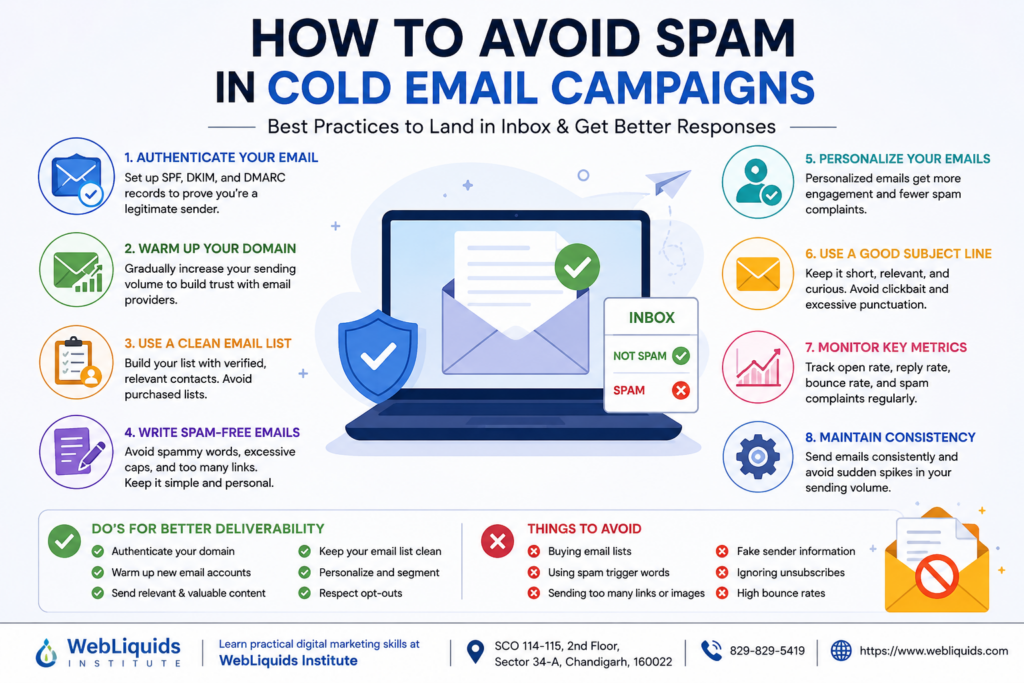
If you are using cold emails to generate leads, build business relationships, or promote services, one of the biggest challenges you will face is getting your emails delivered to the inbox instead of the spam folder. Learning how to avoid spam in cold email campaigns is essential because even the most persuasive email will fail if your prospects never see it.

Many businesses spend hours creating outreach campaigns only to discover that their emails are being filtered by spam detection systems. This can lead to lower open rates, fewer replies, and poor campaign performance.

The good news is that email deliverability can be improved significantly when you follow proven practices. In this comprehensive guide, you will learn how to avoid spam in cold email campaigns, improve sender reputation, increase inbox placement, and maximize your outreach success.


Why Cold Emails Go to Spam

Before understanding solutions, it is important to know why emails land in spam folders.

Email providers such as Google Gmail, Microsoft Outlook, and Yahoo use advanced algorithms to protect users from unwanted emails. These systems analyze multiple factors before deciding where an email should be placed.

Common reasons include:

  • Poor sender reputation
  • Missing email authentication
  • Excessive promotional language
  • Sending too many emails at once
  • Low engagement rates
  • High bounce rates
  • Spam complaints
  • Suspicious links or attachments

Understanding these factors is the first step toward mastering how to avoid spam in cold email campaigns.


The Importance of Email Deliverability

What Is Email Deliverability?

Email deliverability refers to the ability of an email to successfully reach the recipient’s inbox.

Many people confuse delivery with deliverability.

Email Delivery

The email reaches the recipient’s mail server.

Email Deliverability

The email reaches the inbox rather than spam, promotions, or junk folders.

A campaign with excellent deliverability will:

  • Achieve higher open rates
  • Generate more responses
  • Increase conversions
  • Build trust with prospects

Set Up Proper Email Authentication

One of the most effective ways to improve inbox placement is email authentication.

What Is Email Authentication?

Authentication tells email providers that you are a legitimate sender.

The three main authentication protocols are:

SPF (Sender Policy Framework)

SPF verifies that your mail server is authorized to send emails from your domain.

DKIM (DomainKeys Identified Mail)

DKIM adds a digital signature to emails, proving they have not been altered.

DMARC (Domain-based Message Authentication, Reporting and Conformance)

DMARC helps email providers decide what to do with suspicious messages.

Benefits of Authentication

  • Improves trust
  • Protects your domain
  • Reduces spoofing
  • Increases inbox placement
  • Improves sender reputation

Without these records, even high-quality emails may be flagged as spam.


Warm Up Your Email Domain Properly

A new email account should never start sending hundreds of cold emails immediately.

What Is Email Warm-Up?

Email warm-up is the process of gradually increasing email volume to build sender reputation.

Example Warm-Up Schedule

Week 1:

  • 10–20 emails daily

Week 2:

  • 20–40 emails daily

Week 3:

  • 50–80 emails daily

Week 4:

  • 100+ emails daily

This gradual approach helps email providers view your account as trustworthy.

Why Warm-Up Matters

When learning how to avoid spam in cold email campaigns, domain warm-up is one of the most overlooked factors.

A warmed-up domain can achieve:

  • Better deliverability
  • Higher open rates
  • Increased trust
  • Lower spam complaints

Build a High-Quality Email List

The quality of your list directly affects campaign performance.

Avoid Purchased Email Lists

Purchased lists often contain:

  • Invalid addresses
  • Outdated contacts
  • Spam traps
  • Uninterested prospects

These issues can damage your sender reputation.

Use Targeted Prospecting

Instead of buying lists:

  • Research your audience
  • Identify decision-makers
  • Verify email addresses
  • Segment prospects

Verify Every Email

Email verification tools help remove:

  • Invalid emails
  • Disposable addresses
  • Risky contacts

Benefits include:

  • Lower bounce rates
  • Better sender reputation
  • Improved inbox placement

Write Spam-Free Cold Emails

Content plays a major role in email deliverability.

Avoid Spam Trigger Words

Certain words can raise spam scores.

Examples include:

  • Free Money
  • Guaranteed
  • Act Now
  • Risk-Free
  • Earn Cash Fast
  • Limited Time Offer

Using these repeatedly can trigger spam filters.

Keep Subject Lines Natural

Good subject lines:

  • Sound personal
  • Create curiosity
  • Stay relevant

Examples:

  • Quick question about your business
  • Idea for improving lead generation
  • Noticed something on your website

Avoid:

  • ALL CAPS TEXT
  • Excessive punctuation !!!!!!
  • Misleading claims

Personalize Every Email

Personalization significantly improves engagement.

Include:

  • First name
  • Company name
  • Relevant observation
  • Industry-specific details

Example:

“Hi John,

I noticed your company recently expanded into a new market. I have an idea that may help generate additional leads.”

This feels genuine and professional.


Maintain a Strong Sender Reputation

Sender reputation acts like a credit score for email marketers.

The better your reputation, the better your inbox placement.

Factors Affecting Reputation

Open Rates

Higher engagement signals quality.

Reply Rates

Replies show recipients value your emails.

Bounce Rates

High bounce rates indicate poor list quality.

Spam Complaints

Even a small number of complaints can hurt deliverability.

Ways to Protect Reputation

  • Send relevant emails
  • Verify contacts
  • Clean lists regularly
  • Monitor campaign performance
  • Avoid sudden volume spikes

Optimize Email Sending Practices

Following proper sending habits can dramatically improve results.

Send Emails Consistently

Consistency helps build trust with email providers.

Avoid:

  • Sending 20 emails one day
  • Sending 1,000 emails the next day

Maintain predictable volume.

Use a Professional Domain

Good example:

yourname@yourcompany.com

Poor example:

yourcompany123456@gmail.com

Professional domains appear more trustworthy.

Limit Links

Too many links can trigger spam filters.

Best practices:

  • Include one or two relevant links
  • Avoid URL shorteners
  • Use trusted domains

Avoid Large Attachments

Attachments increase spam risk.

Instead:

  • Use cloud storage links
  • Share documents when requested

Monitor Key Deliverability Metrics

Successful cold email campaigns rely on data.

Track:

Open Rate

Measures subject line effectiveness.

Reply Rate

Measures engagement quality.

Bounce Rate

Measures list quality.

Spam Complaint Rate

Measures recipient satisfaction.

Click-Through Rate

Measures content relevance.

Regular monitoring helps identify problems before they impact deliverability.


Common Mistakes That Send Emails to Spam

Many marketers unknowingly damage deliverability.

Avoid these mistakes:

  1. Sending from new domains too quickly
  2. Buying email lists
  3. Ignoring authentication records
  4. Using spammy subject lines
  5. Sending generic mass emails
  6. Overusing images
  7. Including too many links
  8. Failing to remove inactive contacts
  9. Not tracking campaign metrics
  10. Sending irrelevant offers

Eliminating these mistakes will greatly improve your results.


Advanced Strategies for Better Inbox Placement

Once you master the basics, these advanced techniques can help.

Segment Your Audience

Group prospects by:

  • Industry
  • Company size
  • Location
  • Interests

Segmented campaigns often receive higher engagement.

A/B Test Your Emails

Test:

  • Subject lines
  • Call-to-actions
  • Email length
  • Personalization methods

Small improvements can significantly increase performance.

Focus on Value

Instead of selling immediately:

Provide:

  • Useful insights
  • Industry data
  • Helpful resources
  • Practical solutions

Value-driven emails receive better engagement and fewer complaints.


Creating a Long-Term Cold Email Strategy

The most successful outreach campaigns focus on building relationships rather than making immediate sales.

Follow-Up Carefully

Many responses come from follow-up emails.

Best practices:

  • Wait 2–4 days between follow-ups
  • Keep messages short
  • Add new value each time

Stay Professional

Always:

  • Respect privacy
  • Provide an opt-out option
  • Use clear communication
  • Maintain professionalism

Long-term trust improves deliverability and conversion rates.


Learn Cold Email Marketing at WebLiquids Institute

Cold email marketing is a valuable skill for anyone interested in digital marketing, lead generation, and business growth.

Students looking to build practical digital skills can learn at WebLiquids Institute and gain industry-focused training from experienced professionals.

WebLiquids Institute Details

Institute Name: WebLiquids Institute

Address: SCO 114-115, 2nd Floor, Sector 34-A, Chandigarh, 160022

Phone: 829-829-5419

Website: WebLiquids Institute

At WebLiquids Institute, students can gain hands-on knowledge of email marketing, SEO, social media marketing, lead generation, content marketing, and advanced digital marketing strategies that are widely used in today’s industry.


Frequently Asked Questions (FAQs)

1. What is cold email marketing?

Cold email marketing involves sending emails to prospects who have not previously interacted with your business, with the goal of starting a conversation or generating leads.

2. Why do cold emails go to spam?

Cold emails may go to spam due to poor sender reputation, lack of authentication, spam-trigger words, high bounce rates, or low engagement.

3. How important is email authentication?

Email authentication is extremely important because it verifies sender legitimacy and improves inbox placement.

4. What is the ideal daily cold email volume?

It depends on domain reputation, but new domains should start with low volumes and gradually increase through warm-up.

5. Should I buy email lists?

No. Purchased lists often contain invalid contacts and spam traps that can harm deliverability.

6. How can I improve my sender reputation?

You can improve sender reputation by maintaining clean lists, reducing bounce rates, personalizing emails, and encouraging engagement.

7. Do follow-up emails help?

Yes. Many prospects respond after one or more follow-ups, provided they are relevant and respectful.

8. How many links should a cold email contain?

Ideally one or two relevant links. Too many links can trigger spam filters.

9. What is email warm-up?

Email warm-up is the gradual increase of email-sending volume to establish trust with email providers.

10. Is personalization necessary in cold emails?

Yes. Personalized emails generally achieve higher open rates, reply rates, and conversions.


Conclusion

Learning how to avoid spam in cold email campaigns is essential for anyone who wants to achieve consistent success with email outreach. By setting up proper authentication, warming up your domain, maintaining a high-quality email list, personalizing messages, monitoring deliverability metrics, and following email best practices, you can dramatically improve inbox placement and campaign performance.

Remember that successful cold email marketing is not about sending more emails. It is about sending the right message to the right person at the right time. When you focus on value, relevance, and trust, your emails are far more likely to reach the inbox and generate meaningful responses.

If you want professional training in email marketing, lead generation, and digital marketing, consider learning at WebLiquids Institute. Their practical, industry-focused approach can help students and professionals develop the skills needed to succeed in today’s competitive digital landscape.

Ready to Master Digital Marketing? Sign Up Today!

Inspiring Job Placement Success Stories

Our Achievers Ready to Lead the Industry

Recent Blogs

Over 27,000+ Successful Students
With 100% Job Assistance

Over 27,000+ Successful Students
With 100% Job Assistance

Over 27,000+ Successful Students
With 100% Job Assistance

Over 27,000+ Successful Students
With 100% Job Assistance

Modules of Professional Diploma in Digital Marketing with AI Automation Tools

  • Starting With Digital Marketing
  • Domain Concept & Hosting
  • Website Planning & Creation
  • Content Writing & Marketing
  • Psychology of Search
  • (SEO) – ON Page Optimization
  • (SEO) – OFF Page Optimization
  • Search Engine Algorithms Updates
  • Local Business Promotion
  • Google Ads (Search Advertisement)
  • Re-Targeting Concept
  • Display Ads
  • Shopping Ads
  • Video Ads
  • Universal App Ads
  • Setting up Tracking
  • Microsoft Bing Ads
  • Social Media Optimization
  • Social Media Marketing
  • Email Marketing
  • YouTube Marketing
  • Lead Generation & Landing Page
  • E-commerce Marketing Concept
  • Google Analytics Setup
  • Google Webmaster Setup
  • Mobile Marketing
  • Growth Hacking
  • Online Reputation Management
  • Affiliate Marketing
  • Google AdSense
  • Freelancing
  • Interview Preparation
  • Payment Gateway Set-up
  • Google Tag Manager
  • Blogging Marketing / Vlogs Marketing
  • Conversion Rate Optimization – CRO

Over 27,000+ Successful Students
With 100% Job Assistance

Modules of Advanced Digital Marketing Course with AI Tools

  • Starting With Digital Marketing
  • Domain Concept & Hosting
  • Website Planning & Creation
  • Content Writing & Marketing
  • Psychology of Search
  • (SEO) – ON Page Optimization
  • (SEO) – OFF Page Optimization
  • Search Engine Algorithms Updates
  • Local Business Promotion
  • Google Ads (Search Advertisement)
  • Display Ads
  • Video Ads
  • Setting up Tracking
  • Social Media Optimization
  • Social Media Marketing
  • Email Marketing
  • YouTube Marketing
  • Lead Generation & Landing Page
  • Google Analytics Setup
  • Google Webmaster Setup
  • Mobile Marketing
  • Online Reputation Management
  • Interview Preparation
  • Google Tag Manager