



2

How to Improve Website Speed: The Complete Beginner-to-Advanced Guide

How to improve website speed guide

Introduction

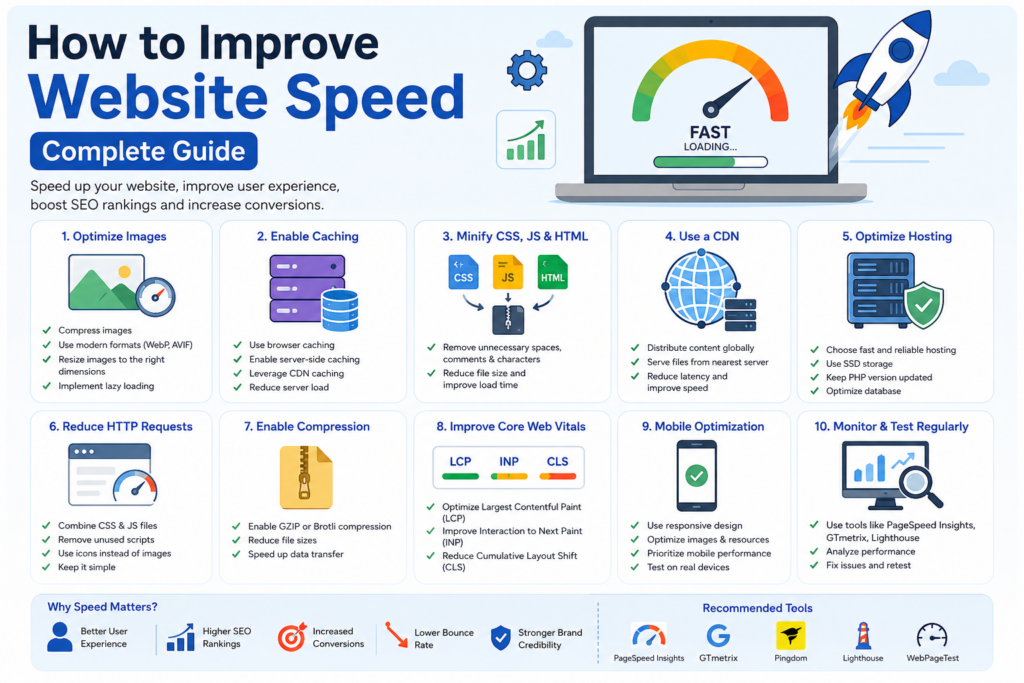
In today’s digital world, website speed plays a major role in online success. Whether you run a business website, blog, eCommerce store, or portfolio, visitors expect pages to load quickly. If your website is slow, users may leave before viewing your content, which can negatively affect engagement, conversions, and search engine rankings.

Understanding how to improve website speed is one of the most important skills for website owners, digital marketers, SEO professionals, and developers. Faster websites provide a better user experience, improve search visibility, and help businesses achieve higher conversion rates.

Google considers page speed as an important ranking factor, especially through Core Web Vitals. Therefore, investing time in website optimization is no longer optional—it’s essential.

This comprehensive guide explains everything you need to know about how to improve website speed, from beginner-friendly techniques to advanced optimization strategies.


Why Website Speed Matters for SEO and User Experience

Website speed affects almost every aspect of online performance.

Benefits of a Fast Website

  • Better user experience
  • Lower bounce rates
  • Higher conversion rates
  • Improved search engine rankings
  • Increased customer satisfaction
  • Better mobile performance
  • Enhanced brand credibility

When visitors land on your website, they expect immediate access to information. A delay of even a few seconds can lead to frustration and abandonment.

Impact on Search Engine Rankings

Search engines want to provide the best experience for users. Fast-loading websites often perform better because they help users access information quickly.

Google’s Core Web Vitals focus on:

  • Largest Contentful Paint (LCP)
  • Interaction to Next Paint (INP)
  • Cumulative Layout Shift (CLS)

Improving these metrics can significantly boost website performance and rankings.


Understanding Website Speed and Performance Metrics

Before learning how to improve website speed, it’s important to understand what affects loading performance.

Key Performance Metrics

Page Load Time

The total time required for a page to load completely.

Time to First Byte (TTFB)

Measures how quickly the server responds to a browser request.

Largest Contentful Paint (LCP)

Indicates when the main content becomes visible.

Interaction to Next Paint (INP)

Measures responsiveness when users interact with the page.

Cumulative Layout Shift (CLS)

Measures visual stability during loading.

Popular Speed Testing Tools

Use these tools regularly:

  1. Google PageSpeed Insights
  2. GTmetrix
  3. Pingdom Website Speed Test
  4. Lighthouse
  5. WebPageTest

These tools help identify speed issues and optimization opportunities.


How to Improve Website Speed with Image Optimization

Images are often the largest files on a website. Optimizing them can dramatically improve loading times.

Choose the Right Image Format

Different formats serve different purposes.

JPEG

Best for photographs and detailed images.

PNG

Ideal for transparent backgrounds.

WebP

Provides excellent compression with high quality.

AVIF

Modern format offering even better compression.

Compress Images Before Uploading

Large images slow down websites significantly.

Use image compression tools to reduce file size without noticeable quality loss.

Resize Images Properly

Avoid uploading oversized images.

For example:

  • Blog images: 1200px width
  • Thumbnails: 300px width
  • Product images: Appropriate display size

Implement Lazy Loading

Lazy loading delays image loading until users scroll near them.

Benefits include:

  • Faster initial page loads
  • Reduced bandwidth usage
  • Improved user experience

Website Caching Strategies for Faster Performance

Caching is one of the most effective methods for improving website speed.

What is Caching?

Caching stores copies of website files so browsers can load pages faster during future visits.

Types of Caching

Browser Caching

Stores files locally on users’ devices.

Server-Side Caching

Generates pages faster by reducing database requests.

Object Caching

Stores database query results for faster retrieval.

CDN Caching

Caches content across global servers.

Benefits of Caching

  • Faster page loading
  • Reduced server load
  • Improved scalability
  • Better user experience

Implementing proper caching can significantly reduce loading times.


Optimizing Website Code and Resources

Website code often contains unnecessary elements that slow performance.

Minify CSS, JavaScript, and HTML

Minification removes:

  • Spaces
  • Comments
  • Unnecessary characters

Benefits include:

  • Smaller file sizes
  • Faster downloads
  • Better performance

Remove Unused Code

Many websites load scripts that are never used.

Regularly audit:

  • CSS files
  • JavaScript libraries
  • Plugins
  • Themes

Combine Files Where Appropriate

Reducing HTTP requests can improve loading times.

Combine:

  • CSS files
  • JavaScript files

When practical, fewer requests result in better performance.

Defer Non-Essential JavaScript

Load critical content first.

Defer:

  • Analytics scripts
  • Social media widgets
  • Chat tools
  • Marketing scripts

This improves perceived performance.


Using a Content Delivery Network (CDN)

A CDN distributes website content through multiple servers worldwide.

How a CDN Works

Instead of loading files from one server, visitors receive content from the nearest location.

CDN Benefits

  • Faster loading globally
  • Reduced server strain
  • Better security
  • Increased uptime

Content Commonly Served by CDNs

  • Images
  • CSS files
  • JavaScript files
  • Videos
  • Downloadable files

Businesses with international audiences particularly benefit from CDN implementation.


Hosting Optimization and Server Performance

Even the best optimization strategies cannot compensate for poor hosting.

Choose Quality Hosting

Hosting directly impacts website speed.

Look for:

  • SSD storage
  • High uptime
  • Modern infrastructure
  • Good support
  • Scalability

Upgrade PHP Versions

Modern PHP versions offer significant performance improvements.

Benefits include:

  • Faster execution
  • Better security
  • Reduced resource usage

Optimize Database Performance

Database issues can slow websites considerably.

Regular tasks include:

  • Removing spam comments
  • Deleting unused data
  • Optimizing tables
  • Cleaning revisions

Enable Compression

Compression reduces file sizes before transmission.

Popular options include:

  • GZIP
  • Brotli

These technologies significantly reduce bandwidth usage.


Mobile Speed Optimization Best Practices

Mobile traffic now dominates internet usage.

Therefore, mobile optimization is essential when learning how to improve website speed.

Use Responsive Design

Responsive websites adapt to all screen sizes.

Benefits include:

  • Better user experience
  • Improved SEO
  • Easier maintenance

Reduce Mobile Resource Usage

Mobile users often have slower internet connections.

Optimize:

  • Images
  • Videos
  • Scripts
  • Fonts

Prioritize Mobile Performance

Focus on:

  • Fast loading
  • Easy navigation
  • Readable content
  • Touch-friendly design

Google primarily uses mobile-first indexing, making mobile speed crucial.


Core Web Vitals Optimization Strategies

Core Web Vitals have become important ranking signals.

Improve Largest Contentful Paint (LCP)

Strategies include:

  • Faster hosting
  • Optimized images
  • CDN usage
  • Reduced render-blocking resources

Improve Interaction to Next Paint (INP)

Methods include:

  • Reducing JavaScript
  • Optimizing event handlers
  • Faster server responses

Improve Cumulative Layout Shift (CLS)

Prevent unexpected layout movements by:

  • Setting image dimensions
  • Reserving ad space
  • Avoiding dynamic content shifts

These improvements help both users and search engines.


Common Website Speed Mistakes to Avoid

Many website owners unknowingly create performance issues.

Frequent Mistakes

Too Many Plugins

Every plugin adds resource demands.

Only keep essential plugins.

Large Uncompressed Images

Huge image files slow pages dramatically.

Excessive Animations

Animations can impact performance if overused.

Poor Hosting Choices

Cheap hosting often leads to slow websites.

Ignoring Updates

Outdated software creates performance and security issues.

Avoiding these mistakes can produce immediate speed improvements.


Website Speed Optimization Checklist

Use this checklist regularly.

Technical Checklist

✔ Compress images

✔ Use modern image formats

✔ Enable caching

✔ Minify CSS

✔ Minify JavaScript

✔ Optimize HTML

✔ Use a CDN

✔ Enable GZIP or Brotli

✔ Remove unused plugins

✔ Optimize databases

✔ Improve Core Web Vitals

✔ Monitor speed regularly

SEO Checklist

✔ Improve page load times

✔ Optimize mobile experience

✔ Reduce bounce rate

✔ Improve user engagement

✔ Track performance metrics

Consistent monitoring ensures long-term performance improvements.


Learn Website Optimization Skills at WebLiquids Institute

Website performance optimization is an essential skill for modern digital marketers, SEO professionals, and web developers.

Students looking to build practical digital skills can learn at WebLiquids Institute and gain industry-focused training from experienced professionals. The institute focuses on real-world digital marketing, SEO, website optimization, and performance improvement techniques used by businesses today.

WebLiquids Institute Details

Institute Name: WebLiquids Institute

Address: SCO 114-115, 2nd Floor, Sector 34-A, Chandigarh, 160022

Phone: 829-829-5419

Website: https://www.webliquids.com

Learning practical website optimization techniques can help students build valuable career skills and improve business websites effectively.


Frequently Asked Questions (FAQs)

1. Why is website speed important for SEO?

Website speed influences user experience and search rankings. Faster websites generally perform better in search results and reduce bounce rates.

2. What is considered a good page load time?

Most experts recommend loading pages within 2 to 3 seconds for optimal user experience.

3. How often should I test website speed?

Testing at least once per month is recommended. Test more frequently after major updates.

4. What is the best free website speed testing tool?

Google PageSpeed Insights is one of the most widely used free tools for performance analysis.

5. Does image optimization improve website speed?

Yes. Compressing and resizing images can significantly reduce loading times.

6. What is a CDN?

A Content Delivery Network distributes content through multiple servers worldwide to improve loading speed.

7. Can too many plugins slow down a website?

Yes. Excessive plugins increase resource usage and can negatively affect performance.

8. What are Core Web Vitals?

Core Web Vitals are performance metrics that measure loading speed, responsiveness, and visual stability.

9. Does website hosting affect speed?

Absolutely. Quality hosting improves server response times and overall website performance.

10. Is mobile speed important for SEO?

Yes. Google uses mobile-first indexing, making mobile performance a critical ranking factor.


Conclusion

Learning how to improve website speed is essential for anyone who wants better SEO rankings, improved user experience, and higher conversions. From image optimization and caching to CDN implementation and Core Web Vitals improvements, every optimization contributes to a faster and more efficient website.

A fast website not only satisfies visitors but also helps search engines understand that your website provides a high-quality user experience. By applying the strategies discussed in this guide, you can successfully master how to improve website speed and create a website that performs exceptionally well across devices and search engines.

If you want professional training in SEO, website optimization, digital marketing, and performance improvement, consider learning at WebLiquids Institute. With industry-focused training and practical guidance, students can develop the skills needed to succeed in today’s competitive digital landscape.

Ready to Master Digital Marketing? Sign Up Today!

Inspiring Job Placement Success Stories

Our Achievers Ready to Lead the Industry

Recent Blogs

Over 27,000+ Successful Students
With 100% Job Assistance

Over 27,000+ Successful Students
With 100% Job Assistance

Over 27,000+ Successful Students
With 100% Job Assistance

Over 27,000+ Successful Students
With 100% Job Assistance

Modules of Professional Diploma in Digital Marketing with AI Automation Tools

  • Starting With Digital Marketing
  • Domain Concept & Hosting
  • Website Planning & Creation
  • Content Writing & Marketing
  • Psychology of Search
  • (SEO) – ON Page Optimization
  • (SEO) – OFF Page Optimization
  • Search Engine Algorithms Updates
  • Local Business Promotion
  • Google Ads (Search Advertisement)
  • Re-Targeting Concept
  • Display Ads
  • Shopping Ads
  • Video Ads
  • Universal App Ads
  • Setting up Tracking
  • Microsoft Bing Ads
  • Social Media Optimization
  • Social Media Marketing
  • Email Marketing
  • YouTube Marketing
  • Lead Generation & Landing Page
  • E-commerce Marketing Concept
  • Google Analytics Setup
  • Google Webmaster Setup
  • Mobile Marketing
  • Growth Hacking
  • Online Reputation Management
  • Affiliate Marketing
  • Google AdSense
  • Freelancing
  • Interview Preparation
  • Payment Gateway Set-up
  • Google Tag Manager
  • Blogging Marketing / Vlogs Marketing
  • Conversion Rate Optimization – CRO

Over 27,000+ Successful Students
With 100% Job Assistance

Modules of Advanced Digital Marketing Course with AI Tools

  • Starting With Digital Marketing
  • Domain Concept & Hosting
  • Website Planning & Creation
  • Content Writing & Marketing
  • Psychology of Search
  • (SEO) – ON Page Optimization
  • (SEO) – OFF Page Optimization
  • Search Engine Algorithms Updates
  • Local Business Promotion
  • Google Ads (Search Advertisement)
  • Display Ads
  • Video Ads
  • Setting up Tracking
  • Social Media Optimization
  • Social Media Marketing
  • Email Marketing
  • YouTube Marketing
  • Lead Generation & Landing Page
  • Google Analytics Setup
  • Google Webmaster Setup
  • Mobile Marketing
  • Online Reputation Management
  • Interview Preparation
  • Google Tag Manager