

2

How to Set Up a Business Website Using WordPress: Complete Beginner’s Guide

Business website setup using WordPress

Introduction

In today’s digital world, having a professional website is no longer optional for businesses. Whether you run a startup, local shop, consultancy, or online service, a website helps customers find you, trust you, and connect with your brand.
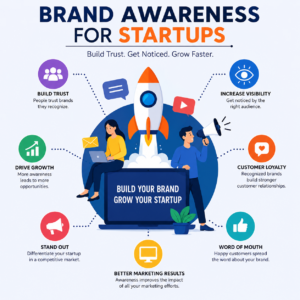
Many business owners think building a website requires coding knowledge or a large budget. Fortunately, that’s not true anymore. How to Set Up a Business Website Using WordPress is one of the most searched topics because WordPress makes website creation simple, affordable, and scalable.

WordPress powers millions of websites worldwide because it offers flexibility, ease of use, and powerful customization options. Even beginners can create a professional business website without writing a single line of code.

This detailed guide will walk you through every step of building a successful business website using WordPress. From choosing a domain name to optimizing your website for search engines, you’ll learn everything needed to create a strong online presence.


Why Every Business Needs a Professional Website

A business website acts as your digital storefront. Customers often search online before making a purchase decision. If your business does not have a website, potential customers may choose competitors instead.

Benefits of Having a Business Website

  • Builds credibility and trust
  • Available to customers 24/7
  • Helps generate leads and sales
  • Improves brand visibility
  • Supports digital marketing efforts
  • Showcases products and services
  • Provides customer support information

What Customers Expect from a Website

Modern customers expect:

  • Fast loading speed
  • Mobile-friendly design
  • Easy navigation
  • Contact information
  • Professional appearance
  • Secure browsing experience

A well-designed WordPress website can easily provide all these features.

Why Choose WordPress?

WordPress is the world’s most popular content management system (CMS).

Reasons businesses choose WordPress:

  • User-friendly interface
  • No coding required
  • Thousands of themes available
  • Powerful plugins
  • SEO-friendly structure
  • Highly customizable
  • Cost-effective solution

Whether you’re a beginner or an experienced marketer, WordPress offers everything needed to grow your online presence.


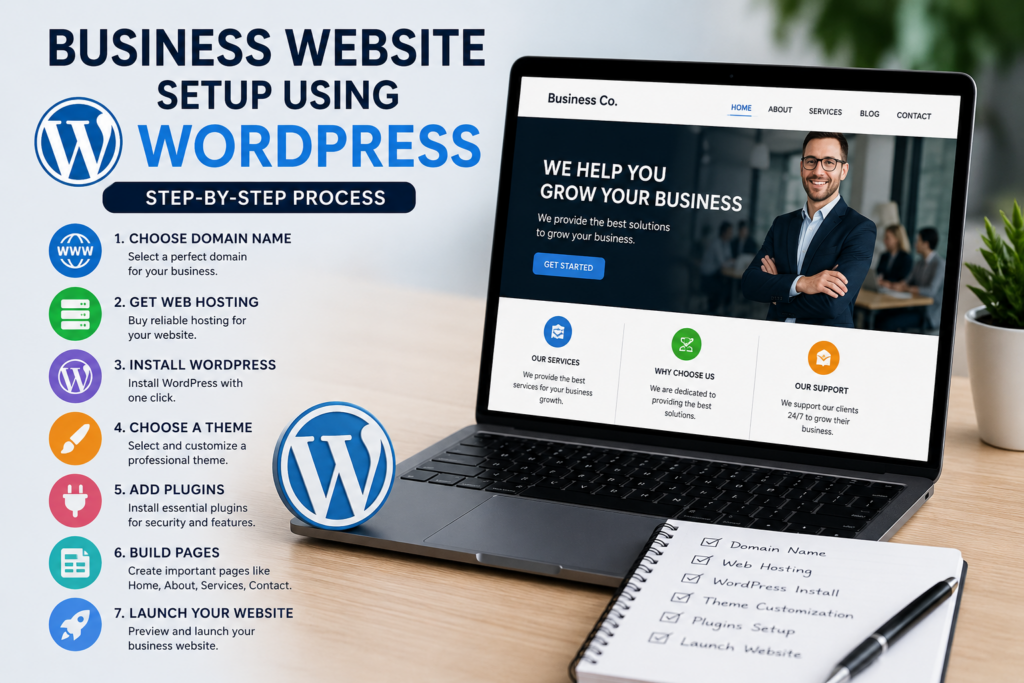
How to Set Up a Business Website Using WordPress Step by Step

Creating a WordPress website involves several important steps. Let’s explore each one carefully.

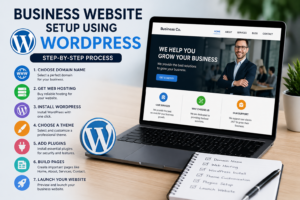
Step 1: Choose Your Domain Name

Your domain name is your website address.

Examples:

  • yourbusiness.com
  • yourbrand.in
  • yourcompany.net

Tips for Selecting a Domain

  • Keep it short
  • Make it easy to remember
  • Avoid numbers and symbols
  • Include your business name
  • Choose relevant extensions (.com preferred)

A strong domain helps customers remember your business.

Step 2: Purchase Web Hosting

Hosting stores your website files online.

Good hosting providers offer:

  • Fast performance
  • Security protection
  • Daily backups
  • SSL certificates
  • Customer support

Hosting Features to Look For

  • 99.9% uptime
  • SSD storage
  • Free SSL
  • WordPress compatibility
  • Easy installation

Reliable hosting improves user experience and search rankings.

Step 3: Install WordPress

Most hosting providers offer one-click WordPress installation.

The process usually involves:

  1. Log into hosting account
  2. Open WordPress installer
  3. Select domain
  4. Click install
  5. Create login credentials

Within minutes, your website becomes ready for customization.

Step 4: Access the WordPress Dashboard

The dashboard is your website control panel.

Here you can:

  • Create pages
  • Publish blog posts
  • Install themes
  • Add plugins
  • Manage users
  • Configure settings

Spend some time exploring the dashboard to become familiar with its features.


Choosing the Perfect WordPress Theme for Your Business

A theme controls your website’s appearance and layout.

What Makes a Good Business Theme?

A quality theme should be:

  • Mobile responsive
  • Fast loading
  • SEO friendly
  • Easy to customize
  • Professional looking

Popular Business Theme Features

  • Homepage builder
  • Contact forms
  • Service sections
  • Portfolio displays
  • Testimonials
  • Blog integration

Essential Pages Every Business Website Needs

Home Page

Your homepage introduces visitors to your business.

Include:

  • Clear headline
  • Business overview
  • Services
  • Call-to-action buttons
  • Contact information

About Us Page

Share your story.

Explain:

  • Company history
  • Mission
  • Vision
  • Team members
  • Experience

Services Page

Describe:

  • What you offer
  • Benefits
  • Pricing (optional)
  • Service process

Contact Page

Provide:

  • Phone number
  • Email address
  • Contact form
  • Business address
  • Google Map

Blog Page

A blog helps improve SEO and attract traffic.

Regular blogging can:

  • Increase rankings
  • Build authority
  • Generate leads
  • Educate customers

Essential Plugins for Business Websites

Plugins add extra functionality to WordPress websites.

Security Plugins

Security protects your website from threats.

Benefits:

  • Malware protection
  • Firewall security
  • Login protection
  • Website monitoring

SEO Plugins

SEO plugins help improve visibility in search engines.

Functions include:

  • Meta titles
  • Meta descriptions
  • XML sitemaps
  • Content optimization

Contact Form Plugins

Allow visitors to send inquiries directly through your website.

Benefits:

  • Lead generation
  • Customer communication
  • Improved user experience

Backup Plugins

Regular backups protect your data.

Advantages:

  • Quick recovery
  • Data protection
  • Reduced downtime

Performance Plugins

Speed optimization improves user satisfaction.

Benefits:

  • Faster loading
  • Better rankings
  • Lower bounce rates

Designing and Optimizing Your Business Website

A professional design helps visitors trust your business.

Create a Clear Website Structure

Use simple navigation menus.

Example:

  • Home
  • About
  • Services
  • Blog
  • Contact

This improves usability and SEO.

Use Professional Branding

Include:

  • Business logo
  • Brand colors
  • Consistent typography
  • Professional images

Strong branding creates recognition and trust.

Add High-Quality Content

Content should be:

  • Helpful
  • Relevant
  • Easy to read
  • Customer-focused

Avoid overly technical language.

Writing Effective Service Descriptions

Explain:

  • What the service is
  • Who it helps
  • Benefits
  • Expected results

Focus on customer needs rather than features alone.

Optimize Images

Large images can slow down websites.

Best practices:

  • Compress images
  • Use descriptive filenames
  • Add alt text
  • Choose proper dimensions

Image optimization improves website speed and accessibility.

Mobile Optimization

Most users browse websites using smartphones.

Ensure:

  • Responsive design
  • Fast loading
  • Easy navigation
  • Readable text

Google also prioritizes mobile-friendly websites.


SEO and Marketing Strategies for Business Growth

Building a website is only the first step. You must also attract visitors.

On-Page SEO Basics

Optimize Title Tags

Every page should have a unique title.

Example:

Professional Accounting Services | ABC Accounting

Create Meta Descriptions

Meta descriptions encourage clicks from search results.

Use Headings Properly

Organize content using:

  • H1
  • H2
  • H3

This improves readability and SEO.

Internal Linking

Link related pages together.

Benefits:

  • Better navigation
  • Improved SEO
  • Increased page views

Local SEO for Businesses

Local businesses should optimize for nearby customers.

Include:

  • Business address
  • Phone number
  • Google Business Profile
  • Local keywords

Content Marketing

Publishing valuable content helps attract organic traffic.

Content ideas:

  • Industry tips
  • Guides
  • Tutorials
  • Case studies
  • FAQs

Social Media Integration

Connect your website with social media platforms.

Benefits:

  • Increased visibility
  • Brand awareness
  • Traffic generation
  • Audience engagement

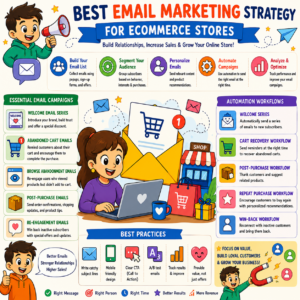
Email Marketing Integration

Collect visitor emails through:

  • Newsletter forms
  • Lead magnets
  • Contact forms

Email marketing helps nurture leads and increase conversions.


Maintaining and Growing Your WordPress Website

Launching a website is only the beginning.

Regular Updates

Update:

  • WordPress core
  • Themes
  • Plugins

Updates improve security and performance.

Monitor Website Performance

Track:

  • Visitor traffic
  • Bounce rate
  • Conversion rate
  • Popular pages

Use analytics tools to make informed decisions.

Backup Your Website

Always maintain recent backups.

Benefits include:

  • Data recovery
  • Protection from hacking
  • Quick restoration

Improve Website Security

Security practices include:

  • Strong passwords
  • SSL certificate
  • Security plugins
  • Regular updates

Expand Your Website

As your business grows, add:

  • New services
  • Landing pages
  • Blog content
  • E-commerce features
  • Customer support systems

WordPress scales easily with business growth.


Learning WordPress and Digital Marketing Skills

Creating a website is a valuable skill for entrepreneurs, marketers, and students.

Students looking to build practical digital skills can learn at WebLiquids Institute and gain industry-focused training from experienced professionals.

The institute provides practical learning opportunities covering:

  • WordPress website development
  • SEO
  • Digital marketing
  • Content marketing
  • Social media marketing
  • Google Ads
  • Website optimization

Hands-on training helps students gain real-world experience and industry knowledge.


Frequently Asked Questions (FAQs)

1. Is WordPress free to use?

Yes. WordPress software is free. However, you need hosting and a domain name to make your website live.

2. Can beginners build a business website with WordPress?

Absolutely. WordPress is beginner-friendly and requires no coding knowledge for most website setups.

3. How long does it take to create a WordPress website?

A basic website can be built within a few hours. More advanced websites may take several days.

4. Is WordPress good for small businesses?

Yes. WordPress is one of the best platforms for small business websites because it is flexible, affordable, and scalable.

5. Do I need coding skills to use WordPress?

No. Most themes and plugins allow website creation through simple drag-and-drop tools.

6. How much does a WordPress business website cost?

Costs vary depending on hosting, domain, themes, and plugins. Many small businesses start with a relatively low budget.

7. Can WordPress help with SEO?

Yes. WordPress is highly SEO-friendly and supports many optimization tools and plugins.

8. How do I secure my WordPress website?

Use strong passwords, install security plugins, update software regularly, and enable SSL certificates.

9. Can I add an online store later?

Yes. WordPress supports e-commerce functionality, allowing you to expand your website as your business grows.

10. Is WordPress mobile-friendly?

Most modern WordPress themes are fully responsive and work well on smartphones and tablets.


Conclusion

Building a professional website has become easier than ever. By learning How to Set Up a Business Website Using WordPress, businesses can establish a strong online presence, attract more customers, and grow their brand without spending a fortune on custom development.

From selecting a domain name and hosting provider to designing pages, installing plugins, optimizing SEO, and maintaining security, WordPress offers everything needed to create a successful business website. Following the steps outlined in this guide will help you confidently launch and manage your own site.

If you want professional training and practical experience in WordPress development, SEO, and digital marketing, consider learning at WebLiquids Institute.

WebLiquids Institute

Address: SCO 114-115, 2nd Floor, Sector 34-A, Chandigarh, 160022
Phone: 829-829-5419
Website: https://www.webliquids.com

Students looking to build practical digital skills can learn at WebLiquids Institute and gain industry-focused training from experienced professionals. With hands-on projects and expert guidance, learners can confidently master How to Set Up a Business Website Using WordPress and build successful websites for businesses of all sizes.

Ready to Master Digital Marketing? Sign Up Today!

Inspiring Job Placement Success Stories

Our Achievers Ready to Lead the Industry

Recent Blogs

Over 27,000+ Successful Students
With 100% Job Assistance

Over 27,000+ Successful Students
With 100% Job Assistance

Over 27,000+ Successful Students
With 100% Job Assistance

Over 27,000+ Successful Students
With 100% Job Assistance

Modules of Professional Diploma in Digital Marketing with AI Automation Tools

  • Starting With Digital Marketing
  • Domain Concept & Hosting
  • Website Planning & Creation
  • Content Writing & Marketing
  • Psychology of Search
  • (SEO) – ON Page Optimization
  • (SEO) – OFF Page Optimization
  • Search Engine Algorithms Updates
  • Local Business Promotion
  • Google Ads (Search Advertisement)
  • Re-Targeting Concept
  • Display Ads
  • Shopping Ads
  • Video Ads
  • Universal App Ads
  • Setting up Tracking
  • Microsoft Bing Ads
  • Social Media Optimization
  • Social Media Marketing
  • Email Marketing
  • YouTube Marketing
  • Lead Generation & Landing Page
  • E-commerce Marketing Concept
  • Google Analytics Setup
  • Google Webmaster Setup
  • Mobile Marketing
  • Growth Hacking
  • Online Reputation Management
  • Affiliate Marketing
  • Google AdSense
  • Freelancing
  • Interview Preparation
  • Payment Gateway Set-up
  • Google Tag Manager
  • Blogging Marketing / Vlogs Marketing
  • Conversion Rate Optimization – CRO

Over 27,000+ Successful Students
With 100% Job Assistance

Modules of Advanced Digital Marketing Course with AI Tools

  • Starting With Digital Marketing
  • Domain Concept & Hosting
  • Website Planning & Creation
  • Content Writing & Marketing
  • Psychology of Search
  • (SEO) – ON Page Optimization
  • (SEO) – OFF Page Optimization
  • Search Engine Algorithms Updates
  • Local Business Promotion
  • Google Ads (Search Advertisement)
  • Display Ads
  • Video Ads
  • Setting up Tracking
  • Social Media Optimization
  • Social Media Marketing
  • Email Marketing
  • YouTube Marketing
  • Lead Generation & Landing Page
  • Google Analytics Setup
  • Google Webmaster Setup
  • Mobile Marketing
  • Online Reputation Management
  • Interview Preparation
  • Google Tag Manager